Email signature software for business Every email signed by you.
Keep signatures, legal notices and banners in one place. Conbool adds them to every email, for Microsoft 365 and Exchange.
No credit card needed · 30 days free
Disclaimer at a glance
Click through an email. Each part shows what Conbool takes care of.
- From
- Anna Berger
- To
- k.schmidt@customer.example
- Subject
- Framework agreement offer 2027
- Rule 20 · Sales · external · English
Musterhaus GmbH · Registered office Berlin · Charlottenburg Local Court HRB 12345 B · Managing Director: Anna Berger · VAT ID DE123456789
Data from your directory
Name, job title, phone and photo come from Entra ID, Active Directory or LDAP. If a value is missing, its line disappears.
- Sync with Entra ID, AD and LDAP
- Portrait photo embedded, never fetched remotely
- QR code with the sender’s contact card
›Read more
Conbool syncs your directory regularly. New employees get their signature without manual work, and a new extension shows up in every email after the next sync. Conbool reaches an on-premises Active Directory through an agent that only connects outbound. Entra ID extension attributes are available as fields too. Anything the directory does not hold, such as a booking link, each person fills in themselves in the Outlook add-in.
Maintain legal details once
Company name, registered office, register and management live centrally in your company data. Every template pulls them from there.
- Starter templates for GmbH, UG, AG and more
- After the signature or below the thread
- Confidentiality notice for external recipients only
›Read more
In Germany, business emails need the same details as a business letter. The starter templates cover GmbH, UG, GmbH & Co. KG, AG, sole proprietorship and registered association, each with the fields required by § 35a GmbHG, § 125a HGB or § 80 AktG. When management changes, you enter it once. Sent through the mail route, the notice cannot be bypassed.
Banners with start and end
Trade fair, webinar or job ad: every banner has its own period and ends by itself. The signature stays.
- Audience by group, domain or recipient
- Click counting, scanner hits kept apart
- Rotating images, one per email
›Read more
Security filters on the recipient side often open links automatically. Conbool keeps these machine hits apart and does not count them as clicks. Reports show the trend per day, per block and the most frequent targets. If you prefer your own analytics tool, Conbool only appends parameters to the links. For inbound email there are banners such as “External message” or a warning about payment requests.
The right template per email
Rules choose by sender, group, domain, recipient and direction. The language of the message picks the version.
- Own templates per company and country
- A subject tag like [EN] selects the rule
- Exceptions, for example for invoice runs
›Read more
Every rule has a priority and can carry a time window. A tag in square brackets at the start of the subject selects a specific rule or leaves the signature out. Conbool removes the tag again before sending. Individual blocks can also depend on conditions, for example only for the sales department.
No more stacked signatures
In replies and forwards, Conbool uses a short version. Long threads do not grow with every footer.
- Separate template for follow-ups
- Full version only in the first email
- Detects replies and forwards
›Read more
A simple transport rule adds the same large footer to every reply. After a few rounds, the email consists mostly of stacked signatures. Conbool detects follow-ups in the thread and uses the short template there, for example name, company and phone in one line. In the Outlook add-in it is called “Short for replies”.
The signature while you write
The add-in shows the signature while composing. Everyone picks their template, shared mailboxes included.
- Outlook for Windows, Mac and web
- Personal fields such as the extension
- Deployed centrally via the admin center
›Read more
If mail flows through Conbool, there are no duplicate signatures: the server sees that the add-in has already inserted one. Personal fields such as extension or booking link are filled in by each person. You decide whether a field may stay empty or must be filled in. For Thunderbird there is a separate extension with the same template choice.
How you work with it
Four steps in the portal. The screenshots show the real product with sample data.
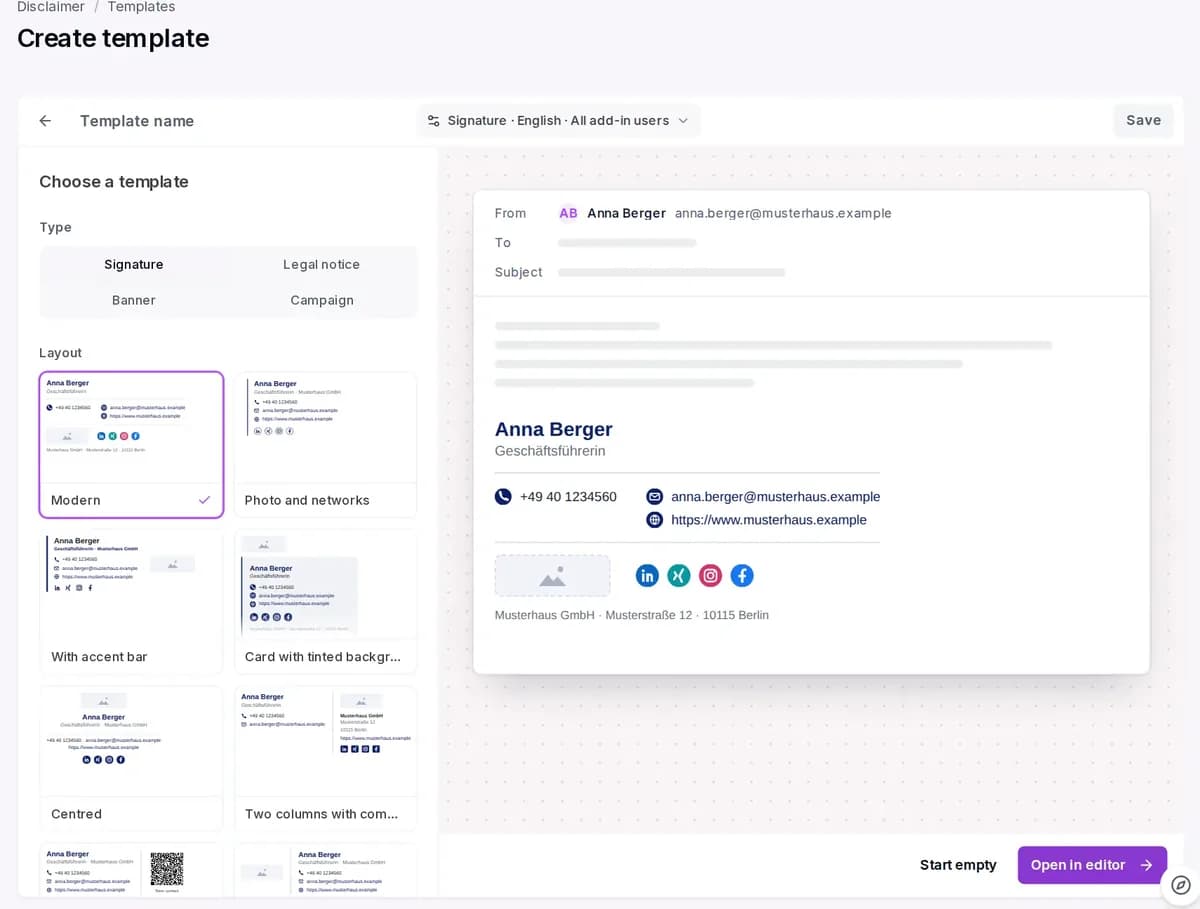
Pick a template, preview on the right 01Design a template
More than 20 starter templates, plus a brand kit with house colour, font and logo for all templates.
- Drag-and-drop building blocks
- Checks for contrast and image size
- Booking button for Teams, Zoom, Calendly
›Read more
The editor shows each template with real data from a chosen sender. Before saving, a check flags images without alt text, weak contrast, very small type, buttons without a target and images over 200 KB. Networks such as LinkedIn, Xing or Instagram, a QR code and a rating are blocks of their own.
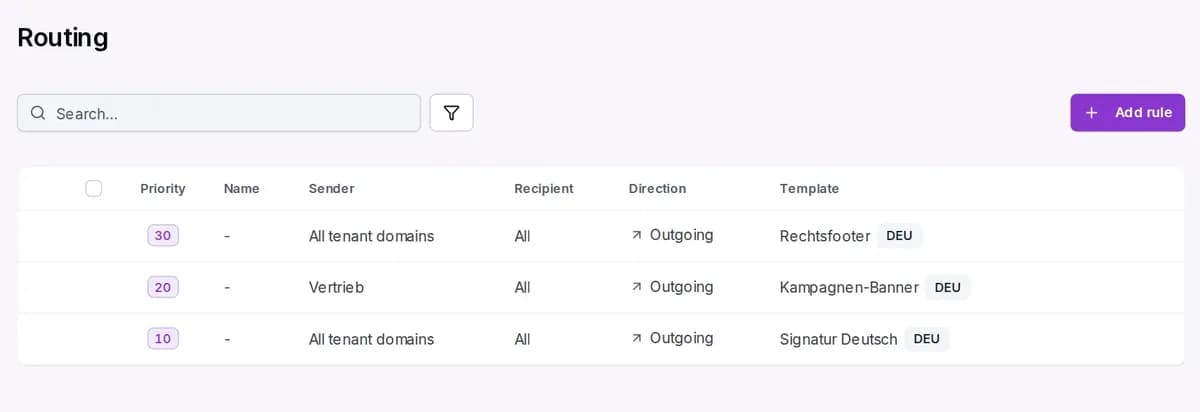
Three rules: legal notice, campaign, signature 02Set the rules
One line per rule: priority, sender, recipient, direction and template.
- Outbound and inbound
- Template per language
- Short version for replies
›Read more
Outbound rules add signature, legal notice, campaign and banner. Inbound rules add a banner and, if you like, a subject prefix, for example for external email. Per rule you set the languages, one of them as default, and a template for follow-ups.
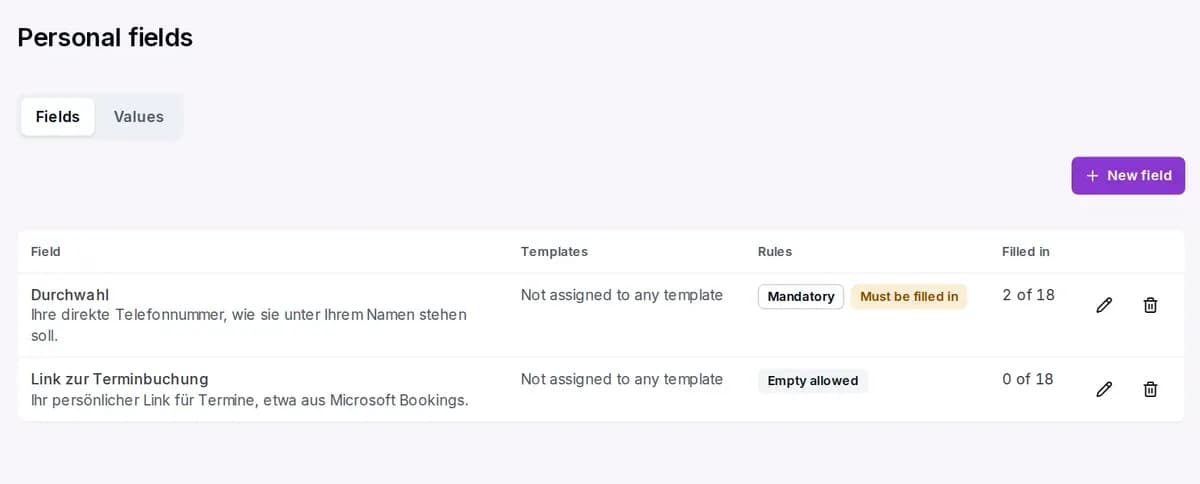
Extension and booking link, filled in per person 03Let people add details
Whatever the directory lacks, employees fill in themselves. You see who has already done it.
- Required or optional fields
- Values also via CSV file
- Empty fields vanish from the signature
›Read more
Personal fields add details to the directory that only the person knows. The add-in asks for them on first start and later under “My details”. If a field is required, the add-in only inserts a signature once it is filled in.
- Conbool DisclaimerSignature addedMy signatureShared mailboxAnna BergerManaging Director+49 30 1234 560Anna Berger · Musterhaus GmbH · +49 30 1234 560
The add-in in the Outlook window 04Roll out
Through the mail route, the signature applies at once. You deploy the Outlook add-in via the admin center.
- Nothing to install on desktops
- Changes apply to the next email
- Add-in works for shared mailboxes
›Read more
You deploy the add-in centrally via the Microsoft 365 admin center, to everyone or to groups. Up to a certain size it inserts the signature while writing; larger signatures are added by the mail route when sending. The editor shows this limit.
With the mail route or without
Not everyone wants to route mail through another service. That is why there are two operating modes.
Through the mail route
Conbool adds the signature when the email is sent. It works for every program and device, line-of-business apps included.
- Every device, including phones and webmail
- Banners, campaigns, time windows, recipient rules
- Cannot be bypassed, solid for legal details
- Requires sending via Conbool
›Read more
Outbound email runs through a connector to Conbool. Signature, legal notice, campaign and banner are added there, then the email goes straight to the recipient. You set up sending via Conbool and the SPF and DKIM records once. This also covers email from ERP, scanners or ticket systems.
Outlook add-in only
The add-in inserts the signature while composing in the mailbox. The email content never leaves Microsoft 365.
- No MX, SPF or DKIM record
- Templates per language and group
- Separate version for replies
- Outlook only, editable in the mailbox
›Read more
The domain is enabled without delivery rights; ownership is proven through the connected Microsoft 365 tenant or a TXT record. Time-limited banners and campaigns are not available in this mode. If you need unchangeable legal details on every email, use the mail route.
You can switch later without rebuilding anything. Once the server takes over, the add-in stays for preview and template choice.
Where signatures usually break
Small flaws catch every recipient’s eye. Conbool handles these eight.
Long threads
Replies get the short version instead of yet another full footer.
Sent Items folder
On request, your own copy gets the same signature the recipient sees.
Images
Logo and photo are embedded in the email. Nobody has to download images first.
Outlook for Windows
Fallback fonts stop Outlook from setting your signature in Times New Roman.
Signed emails
Emails signed with S/MIME or PGP stay untouched, so the signature remains valid.
Empty fields
If the mobile number is missing, its line and label disappear.
Plain-text emails
Every template gets a text version, with your own wording if you like.
Click figures
Hits by security scanners do not count as clicks on your banner.
Fits your environment
Conbool Disclaimer works with what you already have.
Email signature questions
What does email signature software do?
It manages signatures, legal notices and banners for all employees in one place. Instead of leaving each person their own Outlook signature, Conbool adds the approved template to every email.
What is the difference between signature and disclaimer?
The signature names the person: name, job title, contact. The disclaimer holds the company’s legal details and notices. Conbool keeps both as separate blocks that come together in every email.
Why not just maintain signatures in Outlook?
Hand-made signatures drift apart: old logos, wrong titles, missing legal details. Every change means tickets. Changed centrally, every email is current at once, even from a phone.
Where do name, phone and photo come from?
From Entra ID, an on-premises Active Directory or LDAP. Conbool syncs regularly and fills the template for each sender. If a value is missing, the line disappears.
Which legal details belong in business emails?
In Germany, the same as a business letter: company, legal form, registered office, register court and number, representatives. The basis is § 37a HGB, § 35a GmbHG and § 80 AktG, among others. Conbool ships starter templates per legal form.
Can each company and country have its own signature?
Yes. Rules by group, domain, sender and language give each company and country the right template and legal details.
How do time-limited banners work?
Every banner and campaign has a start and an end, for example for a trade fair. After that the block disappears by itself, the signature stays.
How does Conbool count banner clicks?
Through its own redirect, without tracking pixels. Hits by recipients’ security filters are kept separate. Alternatively, Conbool only appends parameters and you count in your own analytics tool.
What happens with replies and forwards?
Conbool detects follow-ups and uses a short version there. Long threads do not grow with every footer, and the full version appears in the first email.
Does the signature show in Sent Items?
On request, yes. Exchange stores the copy before the email leaves the server. Conbool then adds the same signature to it, and the original is never deleted. This needs Microsoft 365 and a separate consent.
Does it work without changing the mail route?
Yes, with the Outlook add-in alone: no MX change, no SPF or DKIM record. This mode only applies in Outlook and can be changed in the mailbox. For enforced legal details, use the mail route.
Does it work on phones?
Yes, through the mail route. The signature is added when sending, so it does not depend on the device, whether Outlook, Apple Mail or webmail.
Do we need HTML skills?
No. The editor uses drag-and-drop blocks and more than 20 starter templates. If you like, you can add a block with your own HTML.
Do recipients see logo and photo right away?
Yes. Conbool embeds images in the email instead of loading them from the web. It takes the portrait photo from the directory and resizes it.
What about signed or encrypted emails?
Conbool does not change emails the sender has already signed or encrypted with S/MIME or PGP. Otherwise the signature would become invalid.
Can employees add their own details?
Yes, through personal fields in the Outlook add-in, such as extension or booking link. You decide whether a field is required and see who has filled it in.
Can the signature be turned off for single emails?
Yes. A tag in square brackets at the start of the subject picks a different rule or leaves the signature out. Rules can also have exceptions, for example for invoice runs.
Can we switch from Exclaimer or CodeTwo?
Yes. Rebuild templates in the editor or bring them over as your own HTML. Exchange transport rules can be recreated as rules in Conbool.
How fast does a change apply?
Through the mail route, from the next email. New employees and changed phone numbers appear after the next directory sync.
Are there ready-made banner templates?
Yes. For inbound email there are “External sender”, a security notice and an absence message, among others. For campaigns there are trade fair, product news, webinar, award and job ad.
Do shared mailboxes get their own signature?
Yes. In the Outlook add-in you choose between your own signature and the shared mailbox’s. Through the mail route, a rule matches the sender address.
Which networks and booking links are possible?
LinkedIn, Xing, X, YouTube, Facebook, Instagram and your own targets. The booking button leads to Calendly, Microsoft Teams, Zoom, Webex or your own address.
Does Disclaimer work with on-premises Exchange Server?
Yes. A send connector routes outbound email through Conbool, where the signature is added. Conbool reaches the directory through an agent that only connects outbound.
Which languages does Conbool Disclaimer support?
Each rule can hold templates in as many languages as you need, one of them as default. Conbool detects the language of the message and picks the matching version.
Are the signatures accessible?
Before saving, the editor checks alt texts, contrast and font size. Every template also gets a text version that screen readers handle well.
Which plan includes Disclaimer?
Disclaimer is included from Suite 1. The product overview shows which products each suite contains.
Ready for consistent signatures?
Try Disclaimer free for 30 days or let us show you.