Secure file transfer for businesses Large files. A small, secure link.
Send, receive and work together, right from Outlook. Every link carries your rules: who, how long, how often.
Recipients need no account and no software. Storage in Germany.
SecureFiles at a glance
Secure file transfer in three directions: send, receive, collaborate. Click through without scrolling.
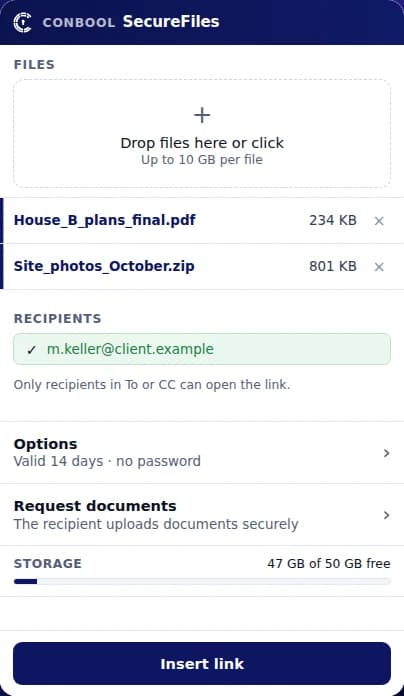
Large attachments become a link
Write the email, attach the file, send. The add-in uploads it encrypted and inserts the link.
- Classic, new and web Outlook
- Pick files straight from SharePoint
- Prompt when sending large attachments
›More detail
Above a size your administrator sets, Outlook steps in on send and offers the protected link. If you want, the link becomes mandatory above that size. The per-file limit lives in your rules. Thunderbird has its own add-on. Without an add-in, you send through the portal in the browser, and whole folders are packed for you. You deploy the Outlook add-in centrally through the Microsoft 365 admin center.
Outsiders send files back securely
One upload link, with a checklist if you like. Senders need neither an account nor software.
- Checklist with required and optional items
- Deadline with automatic reminders
- Signature and answer sheet as PDF
›More detail
Law firms request contracts, medical practices request findings, HR requests certificates, purchasing requests drawings from suppliers. The builder knows groups, fields, conditions and translations into English and Dutch. You see each submission on its own, and the list shows where every person stands. Templates save work on recurring requests. The "Request documents" card is also in the Outlook add-in.
Due 25 Oct · next reminder tomorrow morning
One data room for everyone
Pools are shared folders with roles. Guests join with a link and a code, no account needed.
- Four roles, rights per folder
- Versions, recycle bin and PDF annotations
- Mount as a drive in Explorer
›More detail
The roles are viewer, contributor, editor and manager. You set rights per folder, if you like only after sign-in with an authenticator app. A file with the same name becomes a new version, and older versions stay in the recycle bin until the period ends. Editors highlight and comment on PDF files right in the browser. With the drive, pools show up in Explorer or Finder like a network drive.
As a drive: Z:\Project Hall 3
Every download on your terms
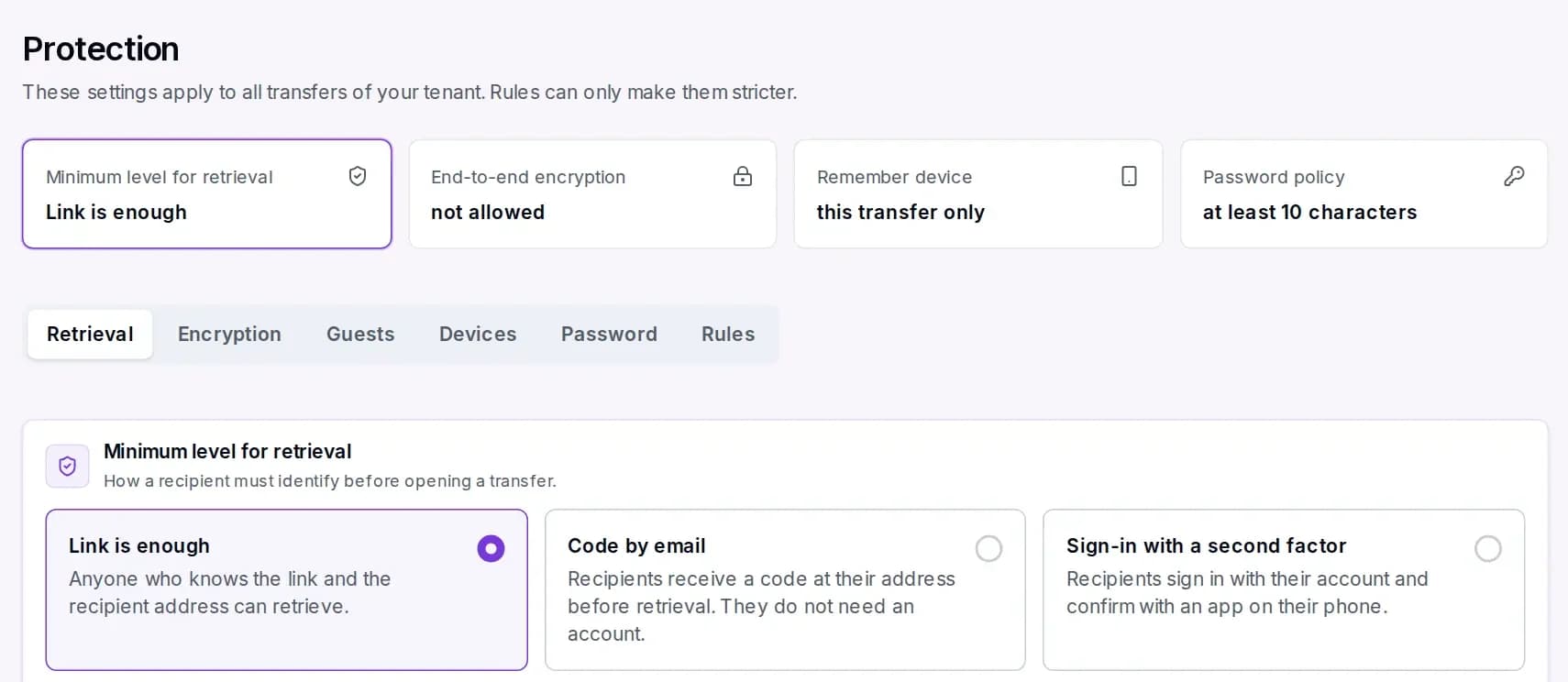
You decide how recipients prove who they are and what they may do with the file.
- Code by email or second factor
- Expiry, download limit, revoke any time
- View only and per-download watermark
›More detail
Your administrator sets a minimum level for the whole tenant, and rules can only make it stricter. Retention ranges from one hour to unlimited. Recipients who remember their device skip the code on the next download. Before release, SecureFiles scans every file for malware. Allowed and blocked recipient domains decide where files may go at all.
Encrypted before it uploads
If you like, the browser encrypts files, names and message. Then even Conbool sees only ciphertext.
- For transfers, pools and inboxes
- Key from a password or your own key
- Can be required by rule
›More detail
Without end-to-end, every file is encrypted with TLS in transit and AES-256 at rest. With end-to-end, malware scan, watermark and view only no longer apply, because the server cannot see the content. A printable recovery key protects access to your files. Your administrator decides whether end-to-end is allowed or required.
The key is derived from the password.
Logged, stored, connected
Every transfer and every download is in the log. Events can flow into your own workflows.
- Log as CSV or PDF
- Webhooks and REST API
- Storage in Germany or your own bucket
›More detail
IP addresses are kept only as a hash, and after a GDPR erasure people appear pseudonymised. The event catalogue lets you pick every event as a webhook, with templates for n8n and Power Automate. The API creates transfers and uploads files into pools. Submissions can land in a delivery target: S3, SFTP or a SharePoint library. If you want to hold the files yourself, connect your own S3-compatible storage.
Export as CSV or PDF
Try it
One link. Your rules.
Switch rules on and off. On the right you see what the recipient gets.
Anna Berger sent you files
Example with made-up data. Which rules apply is set by your administrator per tenant and rule.
Where files are made
SecureFiles works inside the tools your team already uses.
- OutlookClassic, new and on the web. Deployed centrally.
- ThunderbirdIts own add-on from version 128.
- BrowserPortal for sending, inbox and pools.
- DriveMount pools in Explorer or Finder.
- SharePointSend files straight from Microsoft 365.
- APIREST and webhooks for your line-of-business apps.
Instead of detours
Secure file transfer FAQ
What is SecureFiles?
SecureFiles is the secure file transfer of Conbool. Large files go out as a protected link instead of an attachment, straight from Outlook, Thunderbird or the browser. On top come a secure inbox for files from outside and pools as a shared data room. Every download follows your rules and is logged.
How large can files be?
Your administrator sets the per-file limit in the rules. Typical cases are CAD drawings, videos, database exports or medical images of several gigabytes. Uploads run in parts, and an interrupted upload resumes where it stopped. Your mail server limit no longer matters, because only the link travels in the email.
Do recipients need an account or software?
No. Recipients open the link in the browser and prove who they are the way your rule requires, for example with a code by email. Senders to the secure inbox and guests in pools need no account either. Only if you require sign-in with a second factor does the recipient create an account.
How do I send large files from Outlook?
With the SecureFiles add-in for classic Outlook, new Outlook and Outlook on the web. You attach the file or pick it in the add-in, which uploads it encrypted and inserts the link into the email. Above a set size, Outlook steps in on send and offers the link, mandatory if you wish. You deploy the add-in centrally through the Microsoft 365 admin center.
Does SecureFiles work with Thunderbird?
Yes. Thunderbird 128 and later has its own add-on. It also replaces large attachments with a protected link and uses the same rules as the portal.
Can I send files straight from SharePoint?
Yes. In the portal and in the Outlook add-in you pick files straight from SharePoint Online or OneDrive, without a detour through your own computer. Conbool acts only on behalf of the signed-in user and sees only what that user may see. Your administrator enables sending from SharePoint once.
How do I receive files from clients, patients or suppliers?
Through the secure inbox. You create an upload link and share it by email, on your website or in your signature. Outsiders upload without an account, and files are scanned for malware before release. If you like, the inbox gets its own address, your colour, a footer and terms of use.
What is a request with a checklist?
Instead of an empty upload field, you request exactly the documents you need. You mark items as required or optional, with format rules, fields, conditions and a signature. A deadline with automatic reminders on working days keeps senders on track, and they can unsubscribe at any time. At the end you get an answer sheet as PDF.
What is a pool?
A pool is a shared data room with folders, members and guests. Everyone works with the role of viewer, contributor, editor or manager. Rights can be set per folder. Files with the same name become versions, and deleted files go to the recycle bin and can be restored until the period ends.
Can outsiders work in a pool without an account?
Yes, as guests. A guest opens the pool with a personal link and confirms with a six-digit code by email. Your administrator must allow guests first and can limit their roles.
Can pools be mounted as a drive?
Yes. With the drive, pools appear in Windows Explorer and in the macOS Finder, signed in with an app password. Saving, renaming and deleting work as in the portal, and deleted files go to the recycle bin. Conbool support sets up the drive for your tenant.
How do recipients prove who they are?
Depending on the rule, the link plus the recipient address is enough, or a code by email, or sign-in with a second factor. You can add a password that you share separately. Your administrator sets a minimum level for the whole tenant, and single rules can only make it stricter. Failed attempts are throttled.
Do returning recipients have to enter a code every time?
Not necessarily. After a passed check, the recipient can let SecureFiles remember the device, and the next download skips the code. Your rule decides whether that is allowed, for how long, and whether it covers one or all transfers to the same address. A password is still asked for on every transfer.
What do view only and watermark mean?
With view only, recipients see PDF, images and Office documents in the browser and cannot download them. The per-download watermark writes recipient, time and reference on every page. That way a leaked copy can be traced to its download. Neither works together with end-to-end encryption.
How long do files stay available?
As long as your rule says: from one hour through days and months to unlimited. You can also limit the number of downloads and revoke any transfer at any time. Before expiry, SecureFiles reminds the sender and, if you like, recipients who have not downloaded yet. After expiry the files are deleted, and the deletion is logged.
Is every file scanned for viruses?
Yes, before every release. While the scan runs, the transfer waits, and only then does the email with the link go out. If the scan finds malware, the file is not delivered and the sender is notified. End-to-end encrypted files are the exception, because the server cannot see their content.
Is there end-to-end encryption?
Yes, as an option for transfers, pools and inboxes. The browser encrypts files, file names and message before upload, with a key derived from the password or your own key. Conbool then sees only ciphertext. Your administrator decides whether end-to-end is allowed or required by rule.
Where are the files stored?
In the Conbool cloud, files are stored encrypted in data centres in Germany. TLS protects them in transit, AES-256 at rest. If you want to hold the files yourself, connect your own S3-compatible storage, and the connection is tested before anything is stored. In the portal, recipients download straight from storage, with no stop in between.
Is SecureFiles GDPR compliant?
SecureFiles is built for use under the GDPR: encryption, access only by rule, retention with deletion and a log of every action. Data subject access and erasure run directly in the portal, and people appear pseudonymised afterwards. We provide the data processing agreement. More on the page about GDPR-compliant file transfer.
What is in the log?
Who created which transfer and when, who downloaded and when, every scan, every release and every change to rules. IP addresses are kept only as a hash. You can export the log as CSV or PDF, for example for data protection or an audit.
Is there an API and webhooks?
Yes. The REST API reads the state of transfers, requests and pools, creates transfers and uploads files into pools. The event catalogue delivers every event as its own webhook, with templates for n8n and Power Automate. Submissions to the inbox can be stored in S3, on an SFTP server or in a SharePoint library.
Is there a public link for everyone?
Yes, if your administrator enables it. A public download link suits press material, recordings or data sheets. It has a fixed download cap and an expiry.
Can I run SecureFiles in my own data centre?
Yes. Besides the cloud, Conbool is available as an installation in your own data centre, and SecureFiles runs there too. A few features, such as the smaller download copy, exist only in the cloud.
Can rules differ by department?
Yes. A rule applies to all users, a group, a domain or a single user. HR may keep files longer than sales, for example, or management may have to use end-to-end encryption. Each rule holds the file limit, retention, allowed file types, download level and the protection features. No rule can weaken what the tenant minimum level sets.
What is the difference between an inbox and a pool?
An inbox is a one-way street inwards: outsiders upload, only you see the files. A pool is a shared space where team and guests store, read and edit files over a longer time, with a role per person. For a one-off request for documents, use the inbox; for an ongoing project with partners, use a pool.
How is SecureFiles different from WeTransfer and similar services?
Free file sending services are built for private use. They know nothing about your company rules, keep no log for data protection and do not check who downloads a file. SecureFiles is secure file transfer for businesses: your administrator decides who may send what to whom, every download is recorded, and files are stored encrypted in Germany. On top come receiving and collaboration, which a pure sending service does not offer.
How is SecureFiles different from SecureMail?
SecureMail encrypts the email itself, for example with S/MIME, PGP or as a password-protected PDF. SecureFiles handles files that are too large or too sensitive for an email, and receiving files from outside. The two work together: protected retrieval in SecureMail uses a SecureFiles link with a code. Many customers use both products together.
How do I set up SecureFiles?
SecureFiles needs no change to your mail flow. You verify your domain, set in a rule who may send and with which limits, and deploy the Outlook add-in through the Microsoft 365 admin center. From then on your staff send large files straight from Outlook. You create inboxes and pools in the portal whenever you need them.
Can I send whole folders?
Yes. In the portal you drag a folder into the transfer, and SecureFiles packs it into an archive. For very large folders that several people work on for weeks, a pool is the better choice. There, structure, versions and rights are kept.
What does the email to the recipient look like?
The notification carries your sender name, your logo, your colour and your default text. The download page appears in the same look. That way recipients recognise your company rather than an unknown service, which also guards against phishing suspicion. Your administrator sets the design once, centrally.
Can the sender see who downloaded a file?
Yes. The history of every transfer shows which recipient downloaded which files and when. Recipients who have not downloaded yet can be reminded automatically before expiry. You can revoke a transfer at any time, even after the email has gone out.
Which industries is SecureFiles suited for?
Anywhere confidential or large files leave or enter the company. Law firms and tax advisers exchange contracts and receipts with clients, medical practices and hospitals share findings and images, architects and engineers exchange drawings with clients and partners. HR collects application documents, purchasing collects drawings and certificates from suppliers. For all of them the same secure file transfer with rules and a log applies.
What does SecureFiles cost?
SecureFiles is included from Suite 1. Your quote states the price for your number of users. You can try it for free.
Share files, keep control.
Try SecureFiles for free or let us show it to you in a demo.