Email encryption for businesses Encrypted, without detours.
Confidential emails leave encrypted automatically. Your team writes as usual, your recipients need to install nothing.
No credit card needed · 30 days free
Email encryption with SecureMail at a glance
Five topics, one click each.
Encrypted without thinking about it
You define once what is confidential. SecureMail then encrypts every matching email.
- By sender, recipient or group
- Also by attachment, file type and size
- Or by a keyword in the subject
›More details
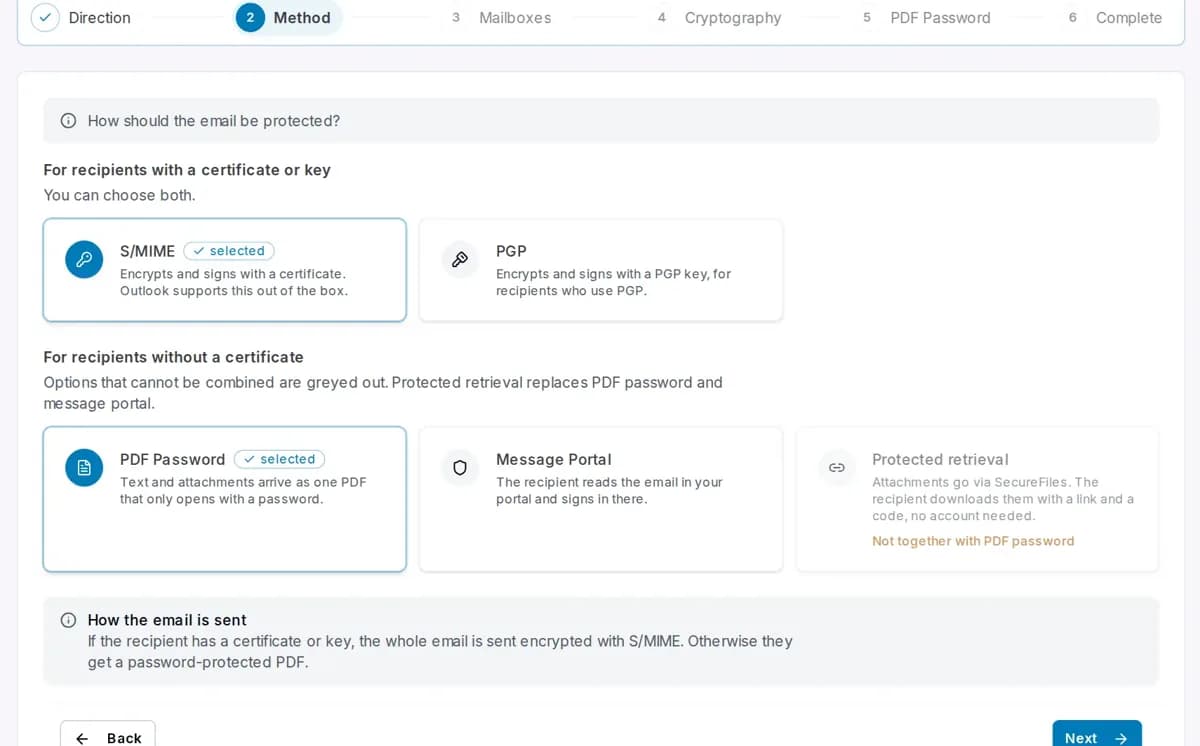
A rule connects senders and recipients with a method. Senders can be single addresses, groups or all mailboxes, recipients single addresses or whole domains. A rule can also be narrowed to emails with or without attachments, to certain file types or to a maximum size. For example, S/MIME without attachments and protected retrieval with attachments. Keywords in the subject such as [secure] complement the rules for single emails. A wizard in the portal guides you step by step through direction, method, mailboxes and cryptography.
Also for recipients without a certificate
If the recipient has neither certificate nor key, the email still arrives securely.
- PDF with password
- Message portal with reply
- Protected retrieval for large attachments
›More details
With the PDF password, text and attachments arrive as one PDF, encrypted with AES-256. The recipient gets the password separately, or you agree on a fixed one. In the message portal the message stays encrypted with Conbool; the recipient is notified, signs in, reads in the browser and replies there. The portal carries your logo and colours. With protected retrieval the text stays readable, and the recipient downloads the attachments via a link with a six-digit code from a second email, without an account. You decide how long and how often they can be retrieved.
One click when it matters
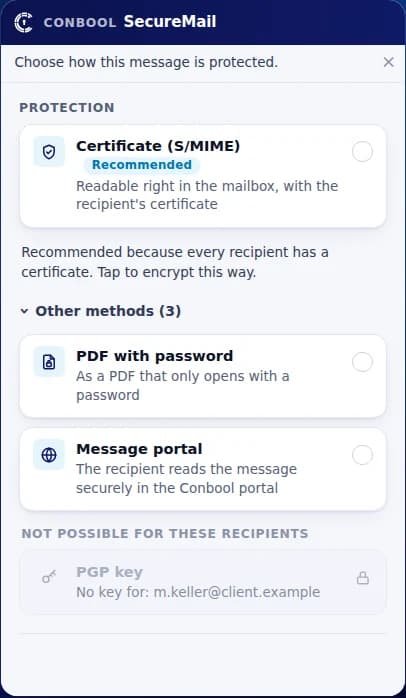
With the add-in, your team encrypts single emails itself, even without a rule.
- “Encrypt” button while writing
- Shows who has a certificate
- Set a PDF password right there
›More details
The add-in runs in classic and new Outlook and in Outlook on the web. Before sending it shows for every recipient whether a certificate or PGP key exists and recommends the right method. For the PDF password it can generate a password and send it to the recipient in a separate email. Your administrators deploy the add-in centrally through Microsoft 365. Anyone not using it is still protected: the rules in the mail flow apply regardless of the email client.
Certificates look after themselves
SecureMail requests, stores and renews certificates without your IT having to keep track.
- Requested from SwissSign
- Renewed before expiry
- Partner keys picked up automatically
›More details
SecureMail requests S/MIME certificates from the publicly trusted certificate authority SwissSign, stores them in the mail flow and renews them before they expire. For internal purposes you can run your own certificate authority. SecureMail creates PGP keys per group and extends them without changing the fingerprint. When a partner writes to you with a signature, SecureMail picks up their certificate or key automatically. Incoming encrypted emails are decrypted, signatures checked and the result noted in the subject if you wish.
- Requestedfrom SwissSign
- Storedin the mail flow
- Renewedbefore expiry
Proof that the email arrived
Every protected email gets a record you can present at any time.
- Receipt from the receiving server
- Checksum of every attachment
- Opening in the portal recorded
›More details
Every protected message gets a chained log: the handover to the receiving server with response code and transaction number, checksums of the delivered content and each attachment, and in the message portal every opening with its time. Each entry carries the checksum of its predecessor, and the head of the chain is sealed every fifteen minutes. From this you get a proof document as a PDF, on demand or automatically by email, immediately or as a daily summary. With S/MIME and PGP the record ends at handover to the mailbox.
- Recipient
- lawfirm@example.com
- Handover
- mx01.example.com
- Response
- 250 2.6.0
- Opened in portal
- 2026-09-12 16:37
S/MIME, PGP, PDF or portal: the right way for every recipient
With a certificate S/MIME, with a key PGP, otherwise the way your rule sets.
- What happens
- Encrypted and signed with the law firm’s certificate.
- What the recipient needs
- Nothing new. Outlook opens it like any other email.
Fits when the recipient has an S/MIME certificate, like many law firms, authorities and companies.
›More details
S/MIME is built into Outlook, Apple Mail and many other email clients. SecureMail finds the recipient’s certificate itself, for example from an earlier signed email, and encrypts the whole message including attachments. If you wish, it is also signed with your certificate.
- What happens
- Encrypted with the partner’s PGP key.
- What the recipient needs
- Their email client with PGP.
Fits when the recipient works with PGP, for example in technical teams.
›More details
PGP is used by many developers, research institutions and newsrooms. SecureMail encrypts to the OpenPGP standard with the partner’s public key and signs with your group’s key. It picks up the partner’s key from their signed emails.
- What happens
- Text and attachments arrive as one protected PDF.
- What the recipient needs
- A PDF reader. The password comes separately.
Fits when single confidential emails go to recipients without a certificate.
›More details
The PDF is encrypted with AES-256 and opens in any PDF reader, including on a smartphone. Further attachments are inside the PDF. SecureMail can send the password in a second email, or you share it another way, for example by phone.
- What happens
- The message stays with Conbool, the recipient is notified.
- What the recipient needs
- A browser. Read and reply after signing in.
Fits when the recipient should reply without setting anything up.
›More details
The message portal runs in the browser, on a computer as well as on a smartphone. The recipient signs in, reads the message, downloads attachments and replies encrypted. Every opening is recorded for your proof of delivery.
- What happens
- The text stays readable, a link replaces the attachments.
- What the recipient needs
- No account. A code from a second email is enough.
Fits when large attachments need to arrive securely. Also requires SecureFiles.
›More details
Protected retrieval uses SecureFiles. The attachments stay with Conbool; the recipient opens the link, requests a six-digit code and downloads the files. You set the retrieval period and number of downloads and can get an email on every download.
SecureMail for Microsoft 365, Exchange and Google Workspace
SecureMail is added as a stop in your mail flow. Nothing has to be installed on the computers.
- Microsoft 365
- Exchange Online
- Exchange Server
- Google Workspace
- Other mail servers
Frequently asked questions about email encryption with SecureMail
S/MIME or PGP: which suits us?
That depends on your partners. S/MIME is common in companies and public authorities, PGP more in technical circles. SecureMail handles both and chooses per recipient.
What does my recipient need?
With a certificate or PGP key, nothing new. Without either, a PDF reader, a browser for the message portal or a code from a second email for protected retrieval is enough.
When PDF password, message portal or protected retrieval?
The PDF password is the simplest way for single confidential emails. The message portal fits when the recipient should reply securely. Protected retrieval suits large attachments and requires SecureFiles.
Do my employees have to learn anything?
No. They write in Outlook or any other email client as before. Encryption happens in the mail flow, following the rules you set.
Do we need the Outlook add-in?
No, SecureMail works without an add-in. The add-in is an addition for employees who want to encrypt a single email themselves or see beforehand who has a certificate.
How much effort do certificates take?
Little. SecureMail requests S/MIME certificates from SwissSign, stores them and renews them before they expire. It creates PGP keys per group and picks up your partners’ certificates and keys from their signed emails.
Can we control encryption through the subject line?
Yes. You define keywords such as [secure]. If one appears in the subject, the email is encrypted, in addition to your rules.
Can we prove that an email was delivered?
Yes. For every protected email SecureMail records the receipt from the receiving server and checksums of the content, and in the message portal also the opening. You get the proof as a PDF, automatically by email if you wish. With S/MIME and PGP the record ends at handover to the mailbox.
Does the proof hold up in court?
It is prima facie evidence, not a qualified timestamp. The logs are chained, sealed and can be fully recalculated. The times come from our own operation; how a court weighs that depends on the individual case.
Does SecureMail help with GDPR and NIS2?
Yes. Both require confidential data to be protected according to the state of the art. SecureMail encrypts according to your rules and documents every protected delivery. Whether your company meets its obligations as a whole is assessed by you or your auditors.
Which mail systems does SecureMail work with?
With Microsoft 365, Exchange Online, Exchange Server, Google Workspace and other mail servers. A wizard in the portal guides you through adding it to the mail flow.
Where are our emails processed?
SecureMail is developed and operated in Germany. You receive a data processing agreement with your order.
Are incoming emails decrypted too?
Yes. SecureMail decrypts incoming S/MIME and PGP emails for your mailboxes and checks signatures. The result can be noted in the subject, for example “[Signature verified]”.
Can signature and PDF password be combined?
Yes. If the recipient has no certificate, the email leaves as a PDF with password or via protected retrieval and is still signed with your certificate. That way the recipient sees it really comes from you.
Does SecureMail work with Thunderbird and on smartphones?
Yes. Encryption happens in the mail flow, not in the email client. The protection therefore applies to every email, whether it comes from Outlook, Thunderbird or the mail app on a smartphone.
Can shared mailboxes send encrypted email?
Yes. Shared mailboxes such as sales@ get their own certificate too. A team can then write encrypted from a shared address without sharing private keys.
Which package includes SecureMail?
SecureMail is included from Suite 1. The product overview shows which products belong to which suite; we quote the price in your offer.
Can we try SecureMail for free?
Yes, for 30 days and without a credit card. You set up SecureMail in the portal and encrypt with your real mailboxes.
What is the difference between encryption and signature?
Encryption makes sure only the recipient can read the email. The signature shows them that the email really comes from you and was not changed on the way. SecureMail does both with S/MIME or PGP, following your rules.
What happens if a recipient gets a certificate later?
Then SecureMail uses S/MIME next time. As soon as the recipient sends one signed email, their certificate is known and the method changes by itself, without you adjusting a rule.
Ready for secure email communication?
Try SecureMail free for 30 days or let us show it to you.