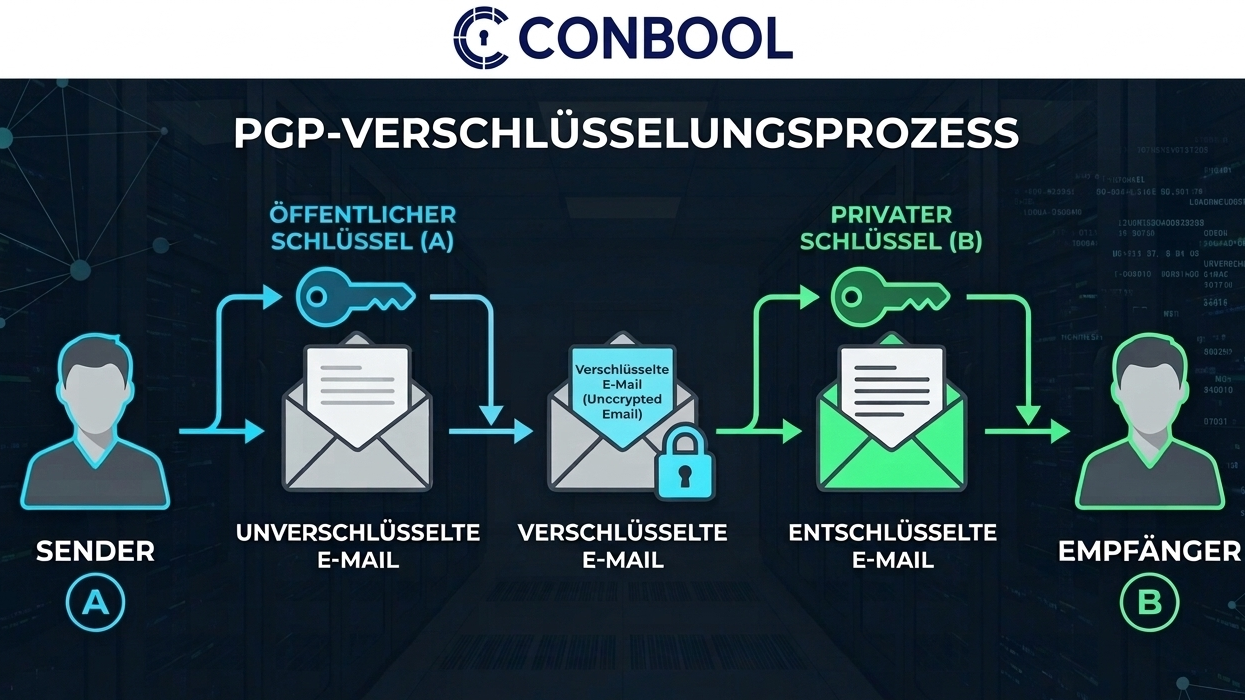
A partner sends their public PGP key and asks for encrypted mail. You will not find the option in Outlook. That is not a settings problem: Outlook simply does not speak OpenPGP.
What Outlook and Microsoft 365 include
In its overview of email encryption in Microsoft 365, Microsoft lists three built-in methods:
- S/MIME with a certificate per person,
- Microsoft Purview Message Encryption, where recipients open the message through a Microsoft page,
- Information Rights Management for usage restrictions.
OpenPGP is not among them. On the same page, Microsoft states that for third-party tools Microsoft 365 does not support PGP/MIME, and only PGP/Inline can be sent and received. PGP/Inline is the older format and is considered error-prone with attachments and HTML messages.
Option 1: GpgOL in classic Outlook
The free Gpg4win includes GpgOL, an add-in for classic Outlook on Windows. Keys are created and stored in Kleopatra on each computer.
That works well for individuals. In a company, questions come up quickly:
- Every computer needs Gpg4win, every user their own key.
- Private keys live on endpoints. A new laptop needs a clean backup.
- Every key has its own expiry date, and nobody has the list.
- A person decides whether to encrypt. Whoever forgets sends in plain text.
Option 2: GpgOL/Web in the new Outlook
The new Outlook no longer loads classic COM add-ins. For that case there is GpgOL/Web, included in Gpg4win 5. It works through a locally running service that sits between Outlook and GnuPG. Private keys stay on your own machine.
The basic principle of option 1 remains: software and keys on every device. On smartphones, where no local GnuPG service runs, it does not help.
Option 3: PGP at the gateway
A gateway encrypts after the message has left the Microsoft 365 tenant and decrypts inbound mail before it arrives there. Nothing changes for employees: they write in Outlook, on their phone or in the browser as always.
Microsoft 365's PGP/MIME limitation does not apply here, because encryption happens outside the tenant. Three things matter:
- Rules instead of a button. A rule based on sender, recipient or content decides whether to encrypt.
- Central keys. Your own keys and your partners' keys live in one place, not on laptops.
- A path for recipients without a key. Otherwise the rule ends in a message nobody can read.
The honest trade-off: inbound messages are stored unencrypted in the mailbox after decryption. If you also need encrypted storage in the mailbox, end-to-end encryption on the device is unavoidable.
The three options compared
| Criterion | GpgOL | GpgOL/Web | Gateway |
|---|---|---|---|
| New Outlook and browser | no | yes | yes |
| Smartphone | no | no | yes |
| Software on every computer | yes | yes | no |
| Private keys | on the device | on the device | central |
| Encrypts without user action | no | no | by rule |
How Conbool handles PGP for Outlook
Conbool SecureMail works as a gateway in front of Microsoft 365 and Exchange. Outbound messages are encrypted and signed with PGP or S/MIME by rule. Optionally, SecureMail imports partners' public keys automatically from inbound signed messages. Your own keys are created automatically per group and renewed before they expire. If a recipient has no key, encrypted PDF or the message portal takes over.
More on the SecureMail for Microsoft 365 and PGP key management pages. For background on PGP in general, see S/MIME vs PGP.
Frequently asked questions
Does Outlook support PGP out of the box?
No. Outlook ships with S/MIME and Microsoft Purview Message Encryption. OpenPGP requires an add-in or a gateway.
Does GpgOL work in the new Outlook?
Classic GpgOL is an add-in for classic Outlook on Windows. For the new Outlook there is GpgOL/Web from Gpg4win 5 onwards, which requires a service running locally on the computer.
Does Microsoft 365 support PGP/MIME?
According to Microsoft, no. With third-party tools only PGP/Inline can be sent and received. A gateway that encrypts after the message has left the tenant is not affected.
What is the downside of PGP at the gateway?
Inbound messages are decrypted at the gateway and are stored unencrypted in the mailbox afterwards. The protection covers the route between companies, not storage in your own mailbox.