Outbound Rules
Configure outbound routing rules for encryption and signing.
When are outbound rules applied?
Outbound rules apply whenever a message is sent from your domain. They enable:
- Encryption: Only the intended recipient can read the message.
- Signature: The authenticity and integrity of the message are verifiable.
Guide: Create an Outbound Rule
1. Create a New Route
- Open the "Routing" menu and click "+".
- In the first step, select "outbound".
2. Select Security Protocol
- Decide which protocols should be used (multiple selection possible):
- S/MIME: Certificate-based encryption and signing
- PGP: Key-based encryption and signing
- Message portal: Secure communication without certificates or keys. Can be used as a primary option or as a fallback when no keys are available.
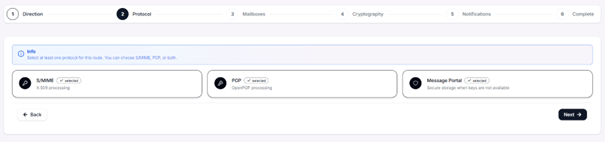
Tip: More details can be found in the Cryptography section.
3. Define Sender and Recipient
- Determine which messages the rule applies to:
- Custom: Specific mailbox or wildcard (*)
- Group: Apply to a predefined group
- All: All outbound messages are included
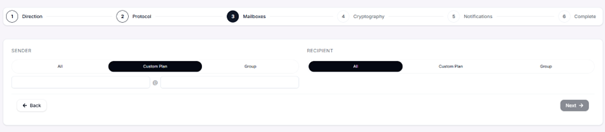
Note: If you have not yet created any groups, follow the guide in the Groups section.
4. Configure Cryptography Options
Depending on the selected protocol, the following settings are available:
Encryption:
- Send without encryption
- Encrypt if possible
- Send only encrypted
Signature:
- Send without signature
- Sign if possible
- Send only signed
Algorithms:
- AES-128, AES-192, AES-256
- SHA-256, SHA-384, SHA-512
S/MIME encryption modes:
- CBC (Cipher Block Chaining)
- GCM (Galois/Counter Mode)
- CTR (Counter Mode)
- CFB (Cipher Feedback)
- OFB (Output Feedback)
S/MIME signature modes:
- Cleartext (cleartext signature)
- Opaque (opaque signature)
PGP signature modes:
- PGP/Inline
- PGP/MIME
Key management:
- Use a specific certificate or key
- Automatic selection from stored imports (default)
Tip: If you want to use a specific certificate or key, import them beforehand in the Cryptography section.
5. Notifications
- Status indicators in the subject line of emails are only possible through your mail server.
6. Save Rule
- Review the configuration in the summary.
- Click "+" to activate the rule. It will then appear in the overview.
Important Notes
- Outbound rules apply exclusively to messages sent from your domain. External senders are not affected.
- Make sure that all required certificates or keys are stored in the "Cryptography" section.