Entwickelt & gehostet in Deutschland · DSGVO-konform
PartnerDokumentation
CONBOOL
  • Blog
  • Über uns
Anmelden
Dokumentation
  • Erste Schritte
  • Konfiguration
  • SecureMail
  • MailGuard
  • Disclaimer
  • Werkzeuge & Support
  • Integrationen
  • Mandantenverwaltung
  • Rollen & Berechtigungen
CONBOOL

Sichere und automatisierte E-Mail-Sicherheit für Unternehmen – einfach, zentral und zuverlässig.

© Copyright 2026 Conbool. Alle Rechte vorbehalten.Mitglied beiBSI Allianz für Cyber-Sicherheit – MitgliedBitkom Mitglied – Digitalverband

Auszeichnungen
  • OMR Leader Badge für E-Mail-Sicherheit
Über uns
  • Über uns
  • Blog
  • FAQ
  • Partner
  • Kontakt
Produkt
  • SecureMail
  • MailGuard
  • Disclaimer
  • DMARC
  • Dokumentation
Add-ins
  • Disclaimer
  • SecureMail
  • SecureFiles
Rechtliches
  • Nutzungsbedingungen
  • Datenschutzerklärung
  • Impressum

Managed PKI

Managed PKI for automatic S/MIME certificate management with SwissSign and D-Trust.

MPKI (Managed Public Key Infrastructure) enables the automatic issuance and management of S/MIME certificates via a connected certificate authority.

Connecting External MPKIs

Conbool currently supports integration with the following providers:

  • SwissSign MPKI
  • D-Trust MPKI

Setup:

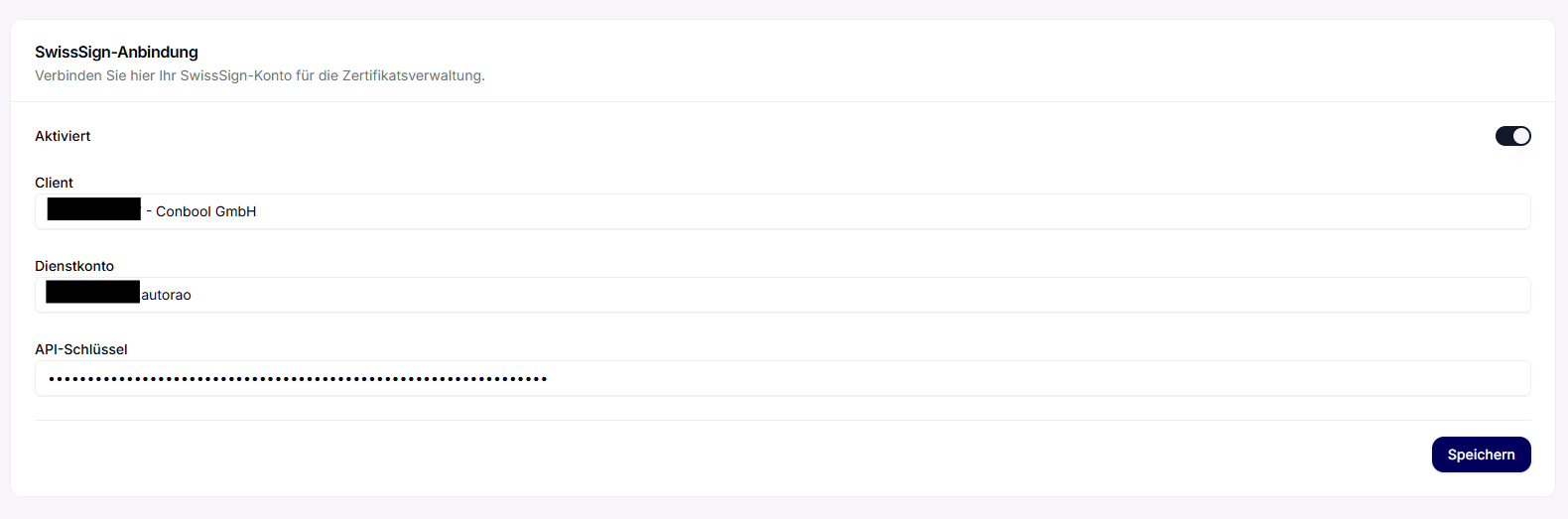
  1. Open Settings → Configure SwissSign | D-Trust MPKI
  2. Enter your API credentials
  3. Save and test the connection

After a successful connection, Conbool can automatically issue, renew, or revoke certificates via the respective MPKI.

Automatic Issuance via Groups

Automatic certificate issuance can be specifically controlled via group policies.

Certificate Ordering via Conbool

If no own MPKI connection is available, Conbool can provide SwissSign certificates on behalf of the customer.
In this case, Conbool handles the application, validation, and renewal of the certificates directly with SwissSign.

Auf dieser Seite

  1. Connecting External MPKIs
    1. Automatic Issuance via Groups
    2. Certificate Ordering via Conbool